Bend Allowance Chart for Sheet Metal: 90 Degree Values, Formula and Worked Example
06 Oct 2026
navinyasanew
5 min read
You have a 2 mm bracket to bend, a drawing with outside dimensions, and a flat blank to cut. You do not want theory right now. You want a number.
This page gives you that number. Below you will find ready-to-use bend allowance and bend deduction charts for 90 degree bends, values for other common angles, the formula behind them, and a worked example you can copy for your own parts.
If you want the deeper explanation of why the neutral axis moves and how K-factor works, read our Bend Allowance: Sheet Metal Design Guide. This post is the quick reference that sits next to it.
The bend allowance formula
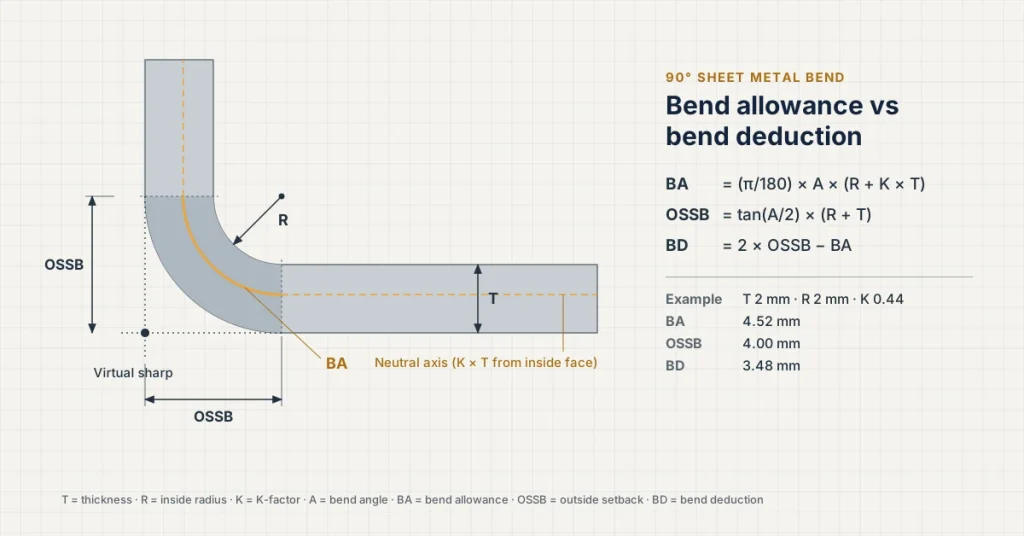
Bend allowance is measured along the neutral axis. For a 90 degree bend, the outside setback is R + T.
Bend allowance (BA) is the length of the bend itself, measured along the neutral axis.
BA = \frac{\pi}{180} \times A \times (R + K \times T)
Where A is the bend angle in degrees, R is the inside bend radius, T is the sheet thickness and K is the K-factor (where the neutral axis sits, as a fraction of thickness from the inside face).
Bend deduction (BD) is what you subtract from the outside dimensions to get the flat length. It is linked to BA through the outside setback (OSSB):
For a 90 degree bend, tan(45) is 1, so OSSB is simply R + T. That makes 90 degree bends easy to check by hand.
How to read the charts
Find your sheet thickness in the left column.
Move across to your inside bend radius.
Use the bend allowance chart if your drawing gives leg lengths to the tangent points.
Use the bend deduction chart if your drawing gives outside (mould line) dimensions. Most shop drawings do.
All values are in millimetres and use K = 0.44, a common starting value for mild steel air-bent at a moderate radius. Swap in your fabricator’s K-factor when you have it.
Bend allowance chart: 90 degree bends (mm, K = 0.44)
Thickness T
R = 1.0
R = 1.5
R = 2.0
R = 3.0
R = 4.0
0.8
2.12
2.91
3.69
5.27
6.84
1.0
2.26
3.05
3.83
5.40
6.97
1.2
2.40
3.19
3.97
5.54
7.11
1.5
2.61
3.39
4.18
5.75
7.32
2.0
2.95
3.74
4.52
6.09
7.67
2.5
3.30
4.08
4.87
6.44
8.01
3.0
3.64
4.43
5.22
6.79
8.36
Bend deduction table: 90 degree bends (mm, K = 0.44)
Thickness T
R = 1.0
R = 1.5
R = 2.0
R = 3.0
R = 4.0
0.8
1.48
1.69
1.91
2.33
2.76
1.0
1.74
1.95
2.17
2.60
3.03
1.2
2.00
2.21
2.43
2.86
3.29
1.5
2.39
2.61
2.82
3.25
3.68
2.0
3.05
3.26
3.48
3.91
4.33
2.5
3.70
3.92
4.13
4.56
4.99
3.0
4.36
4.57
4.78
5.21
5.64
A quick sanity check: in the table above, the inside radius is never smaller than about 1 x thickness for the thicker sheets. Going tighter than the material allows risks cracking on the outside of the bend, especially across the grain.
Other bend angles (1.5 mm sheet, R = 2 mm, K = 0.44)
Not every bend is 90 degrees. Here is how the numbers change for common angles on a 1.5 mm part.
Bend angle
Bend allowance (mm)
Bend deduction (mm)
30 degrees
1.39
0.48
45 degrees
2.09
0.81
60 degrees
2.79
1.26
90 degrees
4.18
2.82
The bend angle here is how far the flange is bent from flat, not the included angle between the flanges. A 45 degree bend leaves a 135 degree included angle. Mixing the two up is one of the most common reasons a calculated blank comes out wrong.
Worked example: a 90 degree L-bracket
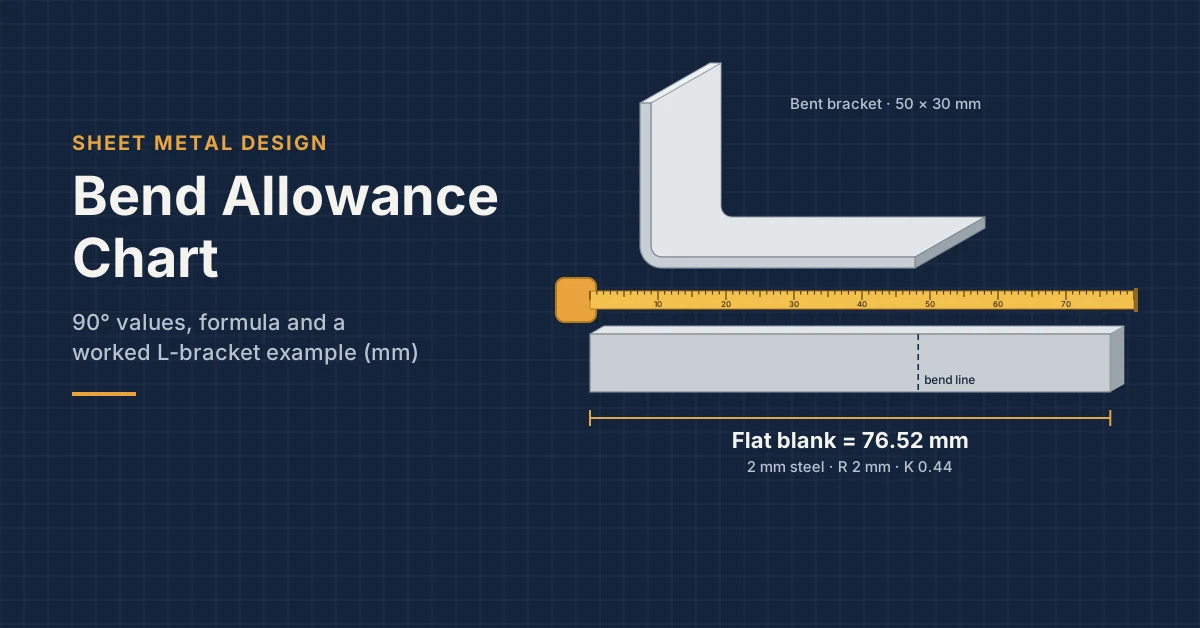
Say you need an L-bracket in 2 mm mild steel, with outside dimensions of 50 mm and 30 mm, and a 2 mm inside radius.
Method 1, bend deduction (the shop-floor way):
Add the outside dimensions: 50 + 30 = 80 mm.
Look up the bend deduction for T = 2.0, R = 2.0: 3.48 mm.
Flat length = 80 – 3.48 = 76.52 mm.
Method 2, bend allowance (the check):
Outside setback for 90 degrees = R + T = 4 mm.
Straight legs to the tangent points: 50 – 4 = 46 mm, and 30 – 4 = 26 mm.
Bend allowance for T = 2.0, R = 2.0: 4.52 mm.
Flat length = 46 + 26 + 4.52 = 76.52 mm.
Both methods give the same answer, which is exactly what you want. If they do not match on your own part, one of the inputs is inconsistent, usually an inside dimension used as an outside one.
How much does K-factor really matter?
More than most freshers expect. Here is a single 90 degree bend in 1.5 mm sheet at a 1.5 mm inside radius:
K-factor
Bend allowance (mm)
0.33
3.13
0.40
3.30
0.44
3.39
0.50
3.53
That is a 0.4 mm spread on one bend. Put six bends on a BIW bracket and the last mounting hole can be off by more than 2 mm. So treat this chart as a starting point:
Ask your fabricator for their bend table. Most will share it. It reflects their press brake, tooling and material.
Use the same K-factor in your CAD sheet metal settings (CATIA, NX, Creo or SolidWorks) so the flat pattern matches.
Bend one test piece, measure it, and correct K before cutting a full batch.
What is a bend allowance chart?
It is a lookup table that gives the developed length of a bend for a given thickness, inside radius and angle. It saves you running the formula every time.
What is the difference between bend allowance and bend deduction?
Bend allowance is added to the leg lengths measured to the tangent points. Bend deduction is subtracted from the outside dimensions. Both give the same flat length when used correctly.
How do you calculate a 90 degree bend?
For 90 degrees, BA = 1.5708 x (R + K x T), and BD = 2 x (R + T) – BA. Then subtract BD from the sum of the outside dimensions.
What K-factor should I use for mild steel?
Around 0.40 to 0.45 is a common starting range for air bending at a moderate radius. Tighter radii push it lower, and coining or bottoming changes it again. Always confirm with your fabricator.
Is there a bend allowance chart for aluminium or stainless steel?
The formula is the same, but the K-factor and minimum radius change. Stainless needs a larger radius and springs back more; soft aluminium can take tighter radii. Recalculate with the right K or use your supplier’s table.
Learn to design sheet metal parts that unfold right the first time
Charts help you calculate. Design judgement tells you which radius, relief and hole position will actually work on the press brake.
Navinyasa’s Sheet Metal & BIW Design Training in Bengaluru covers flat patterns, bend reliefs, flanges, hems, joggles and real automotive BIW parts, with live projects and mentor guidance.
Book a Free Demo. See What Design-Ready Training Looks Like.
Build practical mechanical design skills through domain-focused training in Plastic, Casting and Sheet Metal/BIW with live project exposure, manufacturing knowledge and mentor guidance.
Upcoming batches have limited seats. Book a free demo to understand the program structure, domain options and learning approach.
See How Domain Training Can Strengthen Your Design Career.
CAD software knowledge is only the starting point. Explore how practical training in Plastic, Casting and Sheet Metal/BIW, manufacturing processes and live projects can help you move toward design-ready skills.
Upcoming batch • Limited training seats. Book a free demo to understand the training approach before you decide.